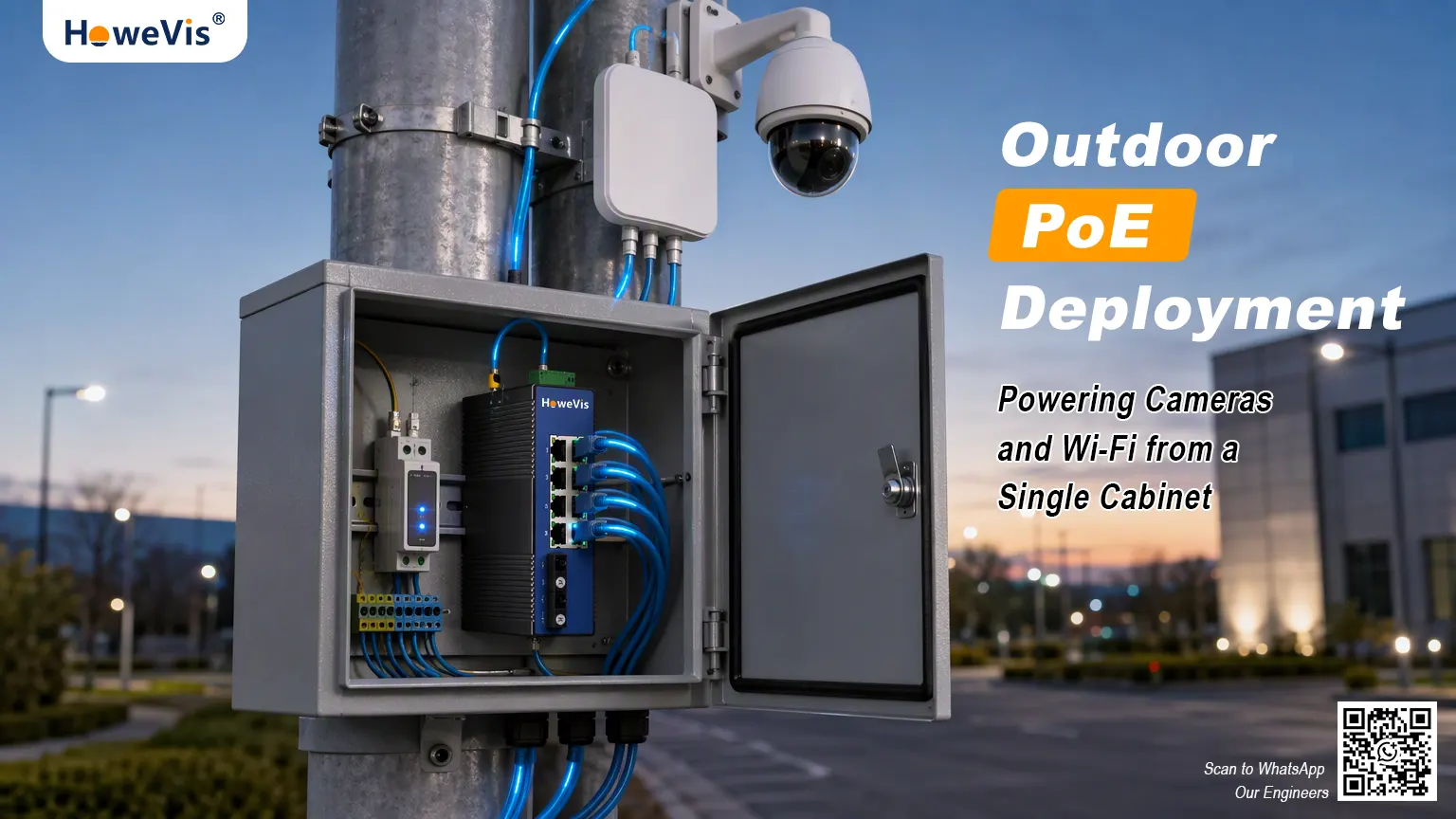
Outdoor surveillance and wireless projects rarely fail because someone chose the wrong camera. More often, the issue appears after installation: a PTZ camera reboots when its heater starts, an access point drops clients during peak traffic, or a device at the far end of a long cable run becomes unstable.
In many cases, the cause is the same—the PoE switch was selected from its port rating alone, without calculating the actual power required by every connected device.
This guide explains how to calculate a practical PoE power budget for outdoor cameras, wireless APs, industrial gateways, and other powered devices. It is written for system integrators, security contractors, and network engineers planning pole cabinets, traffic enclosures, campus networks, or remote sites.
Start With PD Power, Not the Switch Port Rating
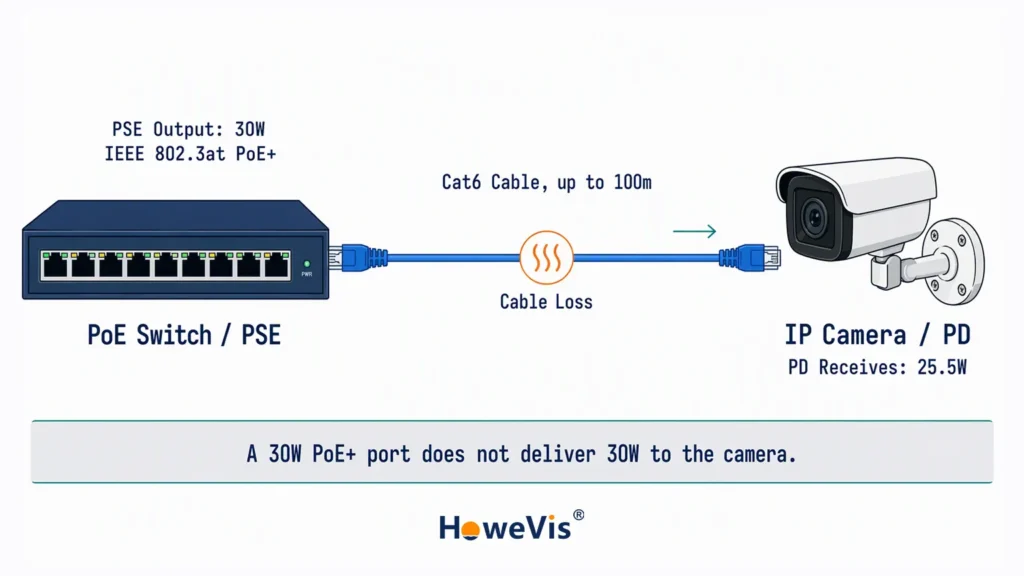
In PoE terminology, the switch is the PSE (Power Sourcing Equipment), while the camera, access point, or gateway is the PD (Powered Device). HPE describes a PSE as equipment that supplies both Ethernet connectivity and DC power over a standard Ethernet cable; IP cameras and wireless APs are among the most common PDs.
The power available at the camera is always lower than the power supplied by the switch. HPE notes that PSE output is intentionally higher than PD consumption to accommodate line losses over a maximum 100-meter Ethernet run.
That is why a “30W PoE+ port” should not be treated as 30W delivered to the camera. Under IEEE 802.3at, the PSE can supply up to 30W, while the PD is guaranteed up to 25.5W.
| Standard | Common Name | Maximum PSE Output | Minimum Power at PD | Typical Outdoor Use |
|---|---|---|---|---|
| IEEE 802.3af | PoE | 15.4 W | 12.95 W | Fixed cameras, sensors, VoIP phones |
| IEEE 802.3at | PoE+ | 30 W | 25.5 W | PTZ cameras, dual-band Wi-Fi 5 APs |
| IEEE 802.3bt Type 3 | PoE++ | 60 W | 51 W | Wi-Fi 6/6E APs, PTZ cameras with heaters |
| IEEE 802.3bt Type 4 | High-Power PoE | 90 W | 71.3 W | High-power wireless bridges, selected outdoor CPEs, heated PTZs |
IEEE 802.3bt raises available power by using all four pairs in the Ethernet cable, rather than the two-pair delivery used by 802.3af and 802.3at. Microchip’s 802.3bt white paper explains that this four-pair approach allows PSE output to reach 90W and PD input power to reach 71.3W, while maintaining backward compatibility with earlier PoE devices.
Before choosing a switch, check the camera or AP datasheet for its maximum input power, not only its typical operating power.
Calculate the Budget in Four Steps
A practical calculation looks like this:
Required PoE budget=∑(PD peak power×cable-loss allowance)×safety margin\text{Required PoE budget} = \sum (\text{PD peak power} \times \text{cable-loss allowance}) \times \text{safety margin}Required PoE budget=∑(PD peak power×cable-loss allowance)×safety margin
This is an engineering planning method, not an IEEE-defined formula. Cable loss depends on conductor gauge, cable length, temperature, current, and whether the PoE connection uses two or four pairs. For early switch selection, however, a conservative allowance is usually enough.
1. Use Peak Power, Not Average Power
Outdoor devices do not consume power evenly throughout the day.
A PTZ camera may draw more current while panning, tilting, or zooming. IR illuminators can sharply increase consumption after dark. In cold climates, enclosure heaters and blowers may add another 15W to 30W when they switch on.
Higher-power devices are exactly why 802.3bt was developed. Microchip identifies PTZ security cameras, 802.11ac/ax access points, kiosks, small cells, and connected lighting as applications that need more power than earlier PoE standards could reliably provide.
For outdoor projects, the practical issue is not average consumption but the worst-case moment: a PTZ camera moving while its IR illuminator and heater are active can briefly draw substantially more power than its nominal rating.
Use the highest realistic operating load from the manufacturer datasheet. If the datasheet lists separate values for normal operation, IR mode, heater mode, and motor movement, use the highest applicable combination.
2. Add an Allowance for Cable Loss
Cable resistance converts part of the delivered power into heat, so the longer and higher-current the run, the more power is dissipated before it reaches the PD. Microchip notes that IEEE PoE standards reserve part of the PSE output for cable dissipation in the worst-case 100-meter scenario; for a 90W Type 4 PSE, approximately 19W is budgeted for cable loss under that assumption.
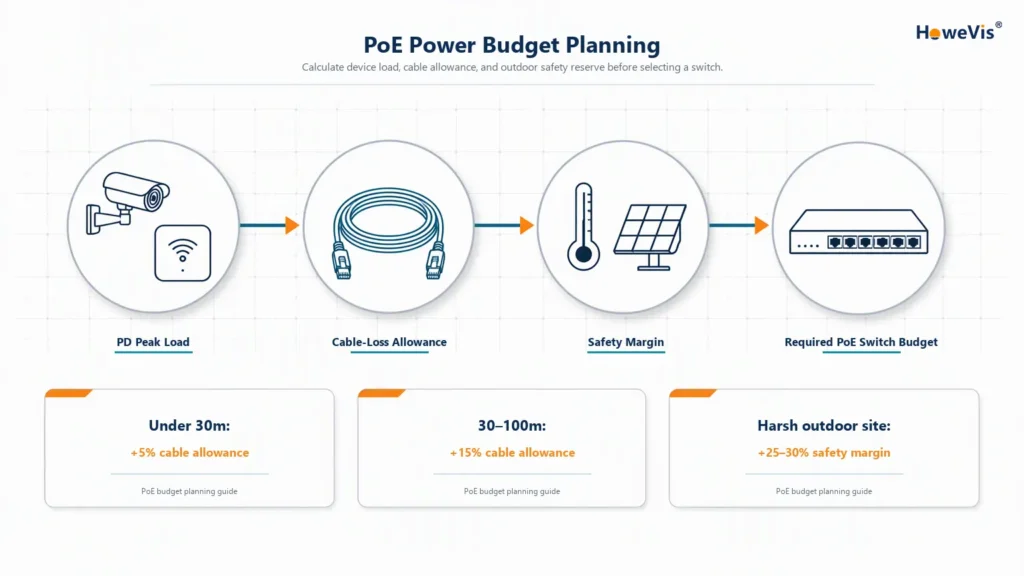
In real projects, actual loss varies with cable gauge, conductor material, temperature, current, and whether power uses two or four pairs. For early switch sizing, a 15% to 20% engineering allowance is a practical starting point for 30- to 100-meter outdoor runs.
Use solid bare-copper Cat6 or Cat6A cable with 23AWG conductors where possible. Avoid copper-clad aluminum cable in permanent outdoor installations; its higher resistance and thermal behavior make voltage drop and long-term reliability harder to control.
3. Include a Safety Margin
A switch should not run permanently at 100% of its advertised PoE budget.
For a standard indoor or protected outdoor cabinet, a 20% reserve is a sensible starting point. For extreme-temperature sites, solar-powered systems, or cabinets with limited ventilation, use 25% to 30%.
That reserve covers startup surges, heater activation, power-supply derating at high temperature, cable aging, and future device additions.
4. Select a Switch With Enough Total Budget
After calculating the total, choose a switch whose total PoE power budget exceeds the result—not merely one whose individual ports match each device.
Worked Example: Outdoor Surveillance Cabinet
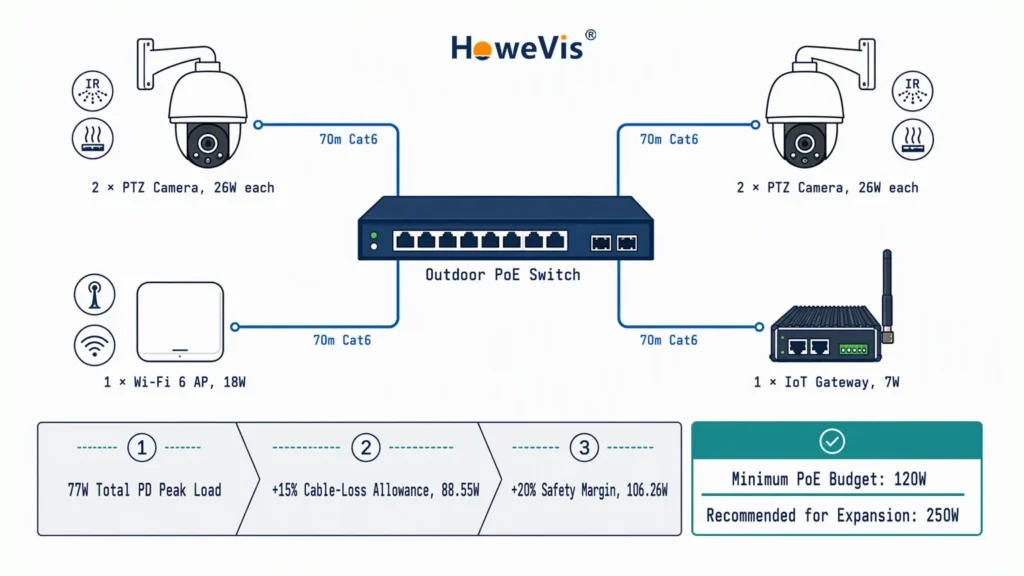
Consider a cabinet containing a PoE switch that must power four devices over approximately 70-meter Cat6 runs:
| Device | Peak Power | Quantity | Subtotal |
|---|---|---|---|
| Outdoor PTZ camera with IR and heater | 26 W | 2 | 52 W |
| Outdoor dual-band Wi-Fi 6 AP | 18 W | 1 | 18 W |
| Industrial IoT gateway | 7 W | 1 | 7 W |
| Total PD peak load | 77 W |
Apply a 15% cable-loss allowance for the 70-meter runs:
77W×1.15=88.55W77W \times 1.15 = 88.55W77W×1.15=88.55W
Apply a 20% safety margin:
88.55W×1.20=106.26W88.55W \times 1.20 = 106.26W88.55W×1.20=106.26W
In this case, a 120W PoE budget is the minimum sensible choice. A 250W managed PoE switch provides more comfortable room for heater cycling, cable variation, and future expansion.
Matching the Switch to the Site
Not every outdoor project needs an industrial switch. The right choice depends on the cabinet environment, available power input, number of devices, and whether remote management is required.
Small Camera and AP Deployments
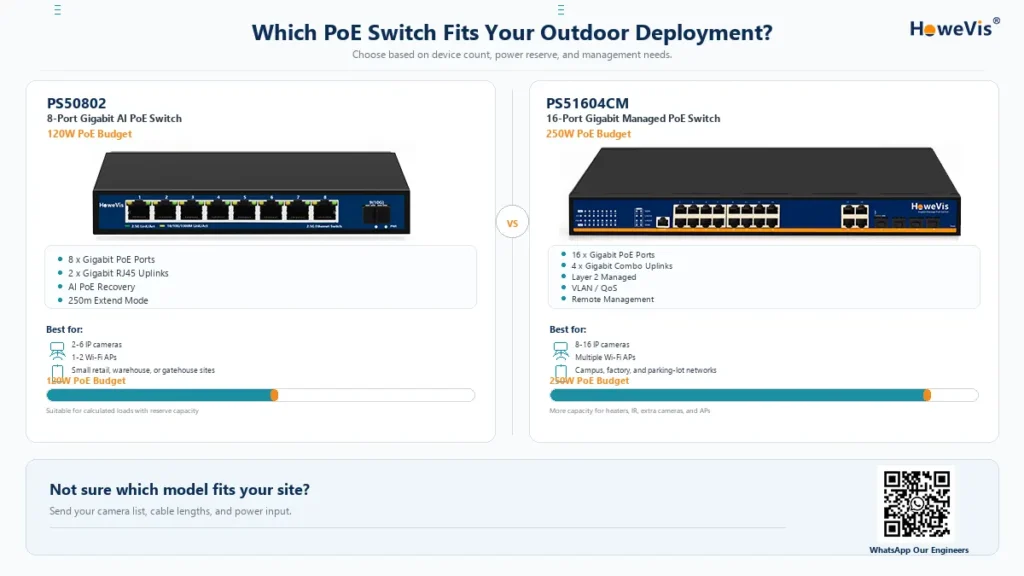
For a small site with a few fixed cameras, one or two APs, and a protected enclosure, the HoweVision PS50802 8-Port Gigabit AI PoE Switch is a practical option.
It provides eight 10/100/1000Base-TX PoE ports, two additional 10/100/1000M RJ45 uplink ports, and a total PoE power budget of 120W. Each PoE port can deliver up to 30W, which covers most fixed IP cameras, standard PTZ cameras, and many outdoor wireless access points.
Its AI PoE function continuously checks connected PDs and can restart a port when a camera or AP stops responding. For unmanned cabinets or small remote sites, this reduces the chance that a single frozen device requires a technician visit.
The switch also includes an Extend Mode that can extend PoE transmission to 250 meters. This can be useful when a camera is installed farther from the cabinet than a standard 100-meter run allows, although extended-mode operation should be planned around reduced Ethernet performance and the actual cable quality.
Larger or Managed Networks
For projects with more cameras, multiple access points, or a requirement for remote configuration, the HoweVision PS51604CM 16-Port Gigabit Managed PoE Switch is a stronger fit than a basic unmanaged model.
The PS51604CM series provides 16 Gigabit PoE ports and four Gigabit Combo uplinks, giving installers flexible connections to an NVR, core switch, router, or fiber uplink. As a Layer 2 managed switch, it supports VLAN, QoS, and other network controls that help separate camera traffic, prioritize video streams, and maintain stable uplink performance.
With a 250W total PoE power budget, it leaves practical room for IR illumination, PTZ movement, heater startup, cable loss, and additional devices after the initial installation. This makes it suitable for multi-camera outdoor surveillance sites, campus Wi-Fi deployments, and small-to-medium security networks that need both power capacity and management visibility.
When an Industrial Switch Is Necessary
A commercial-grade managed PoE switch is often suitable for protected indoor cabinets, equipment rooms, or outdoor enclosures with stable temperature and reliable AC power.
Choose an industrial DIN-rail PoE switch when the installation is exposed to wide temperature swings, DC battery or solar power, surge-prone cabling, vibration, or unmanned remote sites.
For solar-powered cabinets, roadside enclosures, wide-temperature sites, or high-power 802.3bt devices, choose an industrial DIN-rail PoE switch. These models should also be considered when the project requires wide DC input, enhanced surge protection, DIN-rail mounting, or four-pair 802.3bt power delivery.
What Matters Outdoors Beyond Watts
Power budget is only part of the design. Outdoor cabinets introduce conditions that indoor switches rarely face.
Wide DC Input and Voltage Boosting
Solar sites, battery-backed traffic cabinets, and mobile surveillance trailers often provide 12V or 24V DC. Standard 802.3at and 802.3bt PoE requires a much higher DC bus—typically around 50V to 57V at the PSE, depending on the standard and implementation.
A suitable industrial switch should accept wide-range DC input and boost it to a stable PoE output without requiring separate converters. This reduces wiring complexity and removes one more point of failure.
Surge Protection and Isolation
Outdoor Ethernet cable can pick up induced surges and electrical noise. Ports facing cameras, wireless bridges, or long cable runs should have surge protection, and the switch should provide adequate isolation between its Ethernet and power sections.
For roadside, rooftop, or exposed installations, surge protection is not an optional feature. It protects the switch, cameras, APs, and upstream network equipment from damage that may not be covered by a standard commercial-grade switch.
PoE Watchdog for Remote Sites
A frozen camera in an unmanned cabinet is expensive to fix. Someone has to travel to site, open the enclosure, and cycle power manually.
A managed switch with PoE watchdog functionality can periodically ping a connected device. If the camera or AP stops responding, the switch can automatically reboot only that PoE port. This turns a site visit into a self-recovering event.
A Simple Selection Checklist
Before ordering hardware, confirm these points:
| Record the maximum PD input power for every camera, AP, and gateway. |
| Confirm whether each device requires 802.3af, 802.3at, 802.3bt Type 3, or Type 4. |
| Measure or estimate every cable run; do not assume all devices are close to the switch. |
| Use proper bare-copper Cat6/Cat6A cable for permanent outdoor installations. |
| Add cable-loss allowance and a 20% to 30% reserve. |
| Check the switch’s total PoE budget, not only per-port ratings. |
| Choose a managed switch when VLAN, QoS, remote monitoring, or PoE recovery is required. |
| Choose an industrial DIN-rail switch only when temperature, power input, surge exposure, or mounting conditions demand it. |
Need Help Selecting the Right PoE Switch?
For standard outdoor camera and AP deployments, explore the HoweVision PS50802 8-Port Gigabit AI PoE Switch with a 120W PoE budget, AI PoE recovery, and 250m Extend Mode.
For larger surveillance networks, campus Wi-Fi, or projects that require VLAN, QoS, and remote management, see the HoweVision PS51604CM 16-Port Gigabit Managed PoE Switch with a 250W PoE budget and four Gigabit Combo uplinks.
For solar cabinets, roadside enclosures, wide-temperature sites, or high-power 802.3bt devices, browse HoweVision industrial DIN-rail PoE switches.
Or send us your camera/AP models, cable lengths, and available power input. Our team will review the load calculation and recommend the right switch.
FAQs About PoE Power Budgets
1. How much PoE power does an outdoor PTZ camera need?
Most PTZ cameras need 20W to 30W, but models with IR illuminators or heaters may require more. Always use the maximum input power from the datasheet, not the typical operating power.
2. Does cable length reduce PoE power?
Yes. Cable resistance causes power loss, especially on long runs. For planning, add about 5% for runs under 30 meters and 15% to 20% for 30- to 100-meter runs.
3. Should I size a PoE switch by port rating or total PoE budget?
Check both, but the total PoE budget matters most. It determines how many devices the switch can power at the same time; a port rating only shows the maximum power for one port.
4. How much spare PoE capacity should I leave?
Leave 20% to 30% spare capacity. Use around 20% for protected cabinets and 25% to 30% for solar-powered, high-temperature, or heater-equipped sites.
5. When do I need an industrial DIN-rail PoE switch?
Choose an industrial DIN-rail switch for solar or battery-powered sites, roadside cabinets, wide-temperature environments, surge-prone installations, or 802.3bt high-power devices.