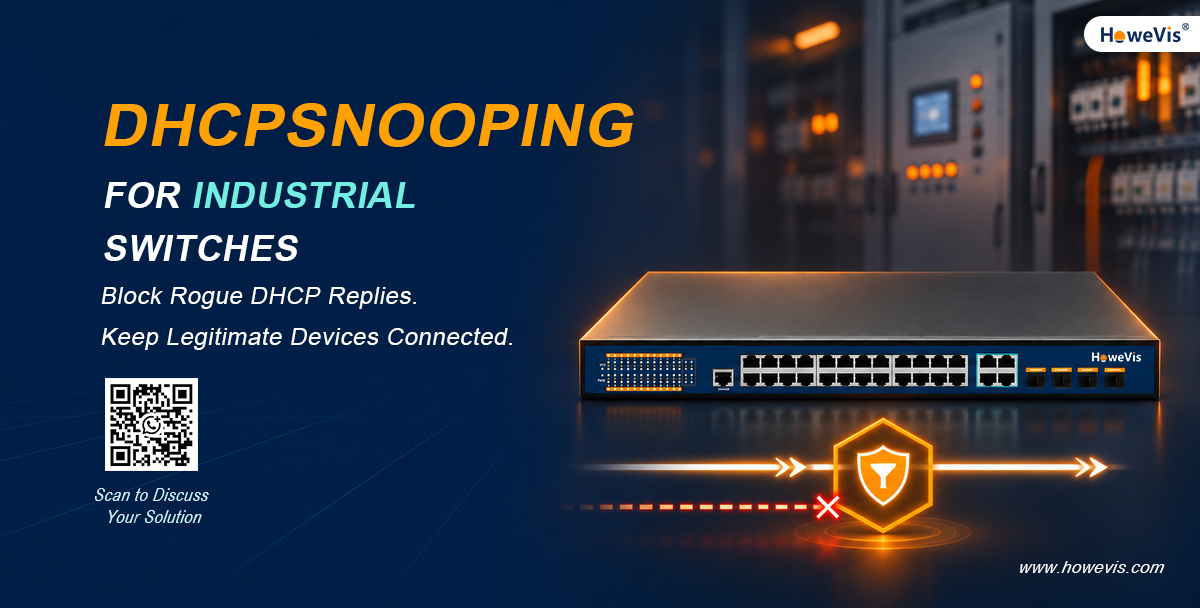
The link lights are on. The cables look fine. But a terminal that worked earlier can no longer reach its application server.
What exactly is causing this?
Before replacing hardware, check the terminal’s network settings—and where they came from.
Imagine a technician connecting a portable router during maintenance. The router’s DHCP service is still enabled. When a terminal requests an address, it receives settings intended for a different network.
Nothing has physically disconnected. The device may simply have the wrong IP configuration.
DHCP snooping helps address this problem by controlling where DHCP server replies can enter a switched network. It also records information about dynamically assigned addresses, giving engineers useful context when troubleshooting client connections.
For an industrial installation, however, blocking unwanted replies is only part of the job. Legitimate devices must still obtain addresses, renew leases, and reconnect after maintenance.
That makes DHCP snooping a configuration and commissioning decision—not just another feature to tick on a datasheet.
What Is DHCP Snooping?
DHCP snooping is a security feature available on supported managed switches. It inspects DHCP messages and applies rules according to the interface through which those messages arrive.
The basic distinction is between trusted and untrusted interfaces:
- Trusted interfaces are approved entry points for DHCP server replies.
- Untrusted interfaces are generally endpoint-facing connections where server replies should not originate.
The switch filters server messages arriving through untrusted interfaces. It can also build a DHCP snooping binding table containing client details such as MAC address, assigned IP address, VLAN, lease information, and access interface.
In everyday terms, the feature helps control who can distribute network settings and keeps a record of the resulting client connections.
It does not authenticate every device, replace a firewall, or decide which applications a terminal may access. Those requirements need separate controls.
Why DHCP Security Matters in Industrial Networks
Industrial switch selection usually begins with operating temperature, power input, mounting space, and fiber connections.
Those are necessary checks. Equipment must suit the environment where it will be installed.
But environmental durability and network security answer different questions.
A wide temperature range does not tell you whether a switch can filter unauthorized DHCP replies. A long software feature list does not establish whether the hardware fits the cabinet, supply voltage, or installation requirements.
Both need attention.
This becomes particularly relevant when maintenance personnel, contractors, and temporary equipment share access to a network. A device connected for a legitimate reason can still have settings that do not belong on that segment.
The goal is to contain those mistakes without making normal service work unnecessarily difficult.
Three Problems to Address Before They Become Support Tickets
1. An unintended DHCP server appears
A rogue DHCP server does not have to be operated by an attacker. It could be a portable router, a test computer, or an appliance with an overlooked default configuration.
If its replies reach DHCP clients, those clients may receive an unexpected address, subnet mask, gateway, or DNS server.
DHCP snooping helps by filtering server replies received on interfaces that have not been trusted for that purpose.
The protection depends on the trust boundary. If an unwanted server sits behind a trusted connection, the switch may allow its replies through. That is why engineers need to understand what is connected beyond each interface.
2. Excessive DHCP traffic reaches the network
Some switches support DHCP packet-rate limits. These can help constrain excessive traffic, but the threshold should reflect the actual connection.
A port serving one terminal is different from an uplink carrying requests from many downstream devices. A restart after a power interruption may also produce a legitimate burst of requests.
Check what happens when the limit is exceeded. Depending on the implementation, packets may be dropped or the interface may enter an error-disabled state. The recovery method should be understood before the setting reaches production.
An aggressive limit can create connectivity problems rather than prevent them.
3. Troubleshooting lacks connection details
When a terminal cannot communicate, its IP address is only the beginning. Engineers may also need its VLAN and physical connection point.
A DHCP snooping binding table can help locate dynamically addressed clients. It should not be treated as a complete asset inventory, however. A static-address device does not automatically generate a dynamic lease entry.
An absent binding therefore does not, by itself, prove that a device is disconnected.
Start With the Addressing Plan
Before enabling DHCP snooping, establish how devices on the target segment receive their addresses.
Do not infer this from equipment labels. A PLC, HMI, camera, or gateway may use static addressing or DHCP depending on the project.
A short inventory should include:
| Item | What to record |
|---|---|
| Dynamic clients | VLAN, access interface, server, and expected settings |
| Static-address devices | IP address, MAC address, and connection point |
| DHCP servers | Location and approved network segments |
| Relay devices | How requests and replies cross subnet boundaries |
| Shared connections | Downstream switches and client counts |
| Alternate paths | Where replies may enter after a topology change |
This information makes configuration more predictable and gives the supplier a clearer basis for recommending equipment.
A request for “DHCP snooping support” alone does not explain the topology, addressing mix, or behavior expected during recovery.
Trusted and Untrusted Ports: Follow the Server Replies
The right question is not simply, “Which interface is the uplink?”
It is:
Through which interface will a legitimate DHCP server reply enter this switch?
The answer could be a direct server connection, an aggregation link, or a path through a DHCP relay.
Trust should follow that actual traffic path. Endpoint-facing interfaces normally remain untrusted unless the design requires otherwise.
A simple example looks like this:
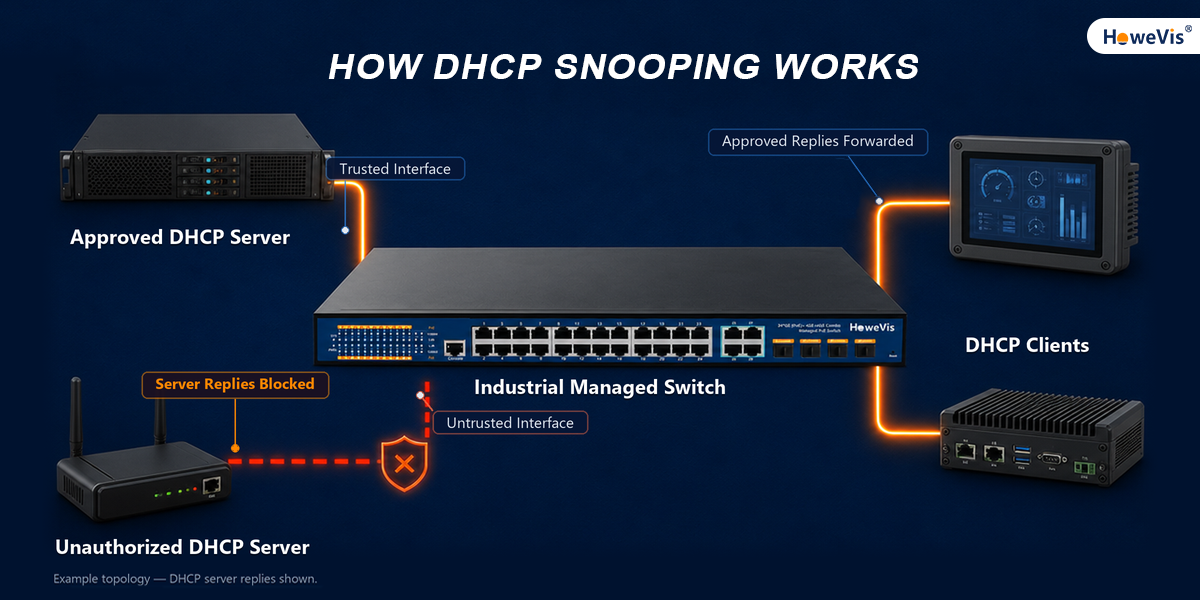
This diagram shows the principle, not a complete production design. Real installations may include multiple VLANs, relays, shared connections, and alternate links.
Also remember what “trusted” means here. It allows the relevant DHCP server messages to enter; it is not a declaration that every device behind that interface is safe.
DHCP Relay and Option 82: Check Them Separately
When clients and the DHCP server are on different subnets, the network may use a DHCP relay to carry their messages.
Option 82 is a separate consideration. It carries relay-agent information that can help identify where a request originated.
Crossing a VLAN boundary does not automatically mean every access switch must insert Option 82. At the same time, some vendor-specific security modes have additional requirements. Certain IP Source Guard configurations that check both IP and MAC information, for example, depend on particular Option 82 settings.
Before deployment, establish:
- Which device performs the relay function?
- Does any device insert or process Option 82?
- How does the DHCP server handle that information?
- Will intermediate switches accept the resulting messages?
- Does the selected security mode introduce additional dependencies?
Test the complete path. Seeing “Option 82 supported” on several datasheets does not demonstrate that their configurations will work together.
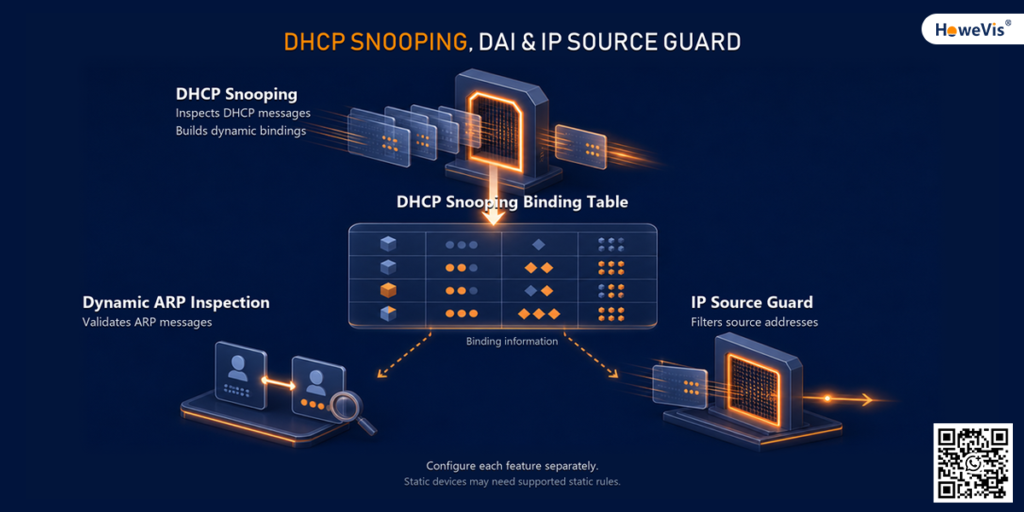
DHCP Snooping, DAI, and IP Source Guard
These features often appear together in switch specifications, but they perform different jobs.
| Feature | Main role | Configuration focus |
|---|---|---|
| DHCP snooping | Inspect DHCP traffic and maintain client bindings | VLAN scope, trusted interfaces, and packet handling |
| Dynamic ARP Inspection | Validate applicable incoming ARP messages | Binding information, static rules, and interface trust |
| IP Source Guard | Restrict source-address use on supported interfaces | Binding source and selected filtering mode |
Dynamic ARP Inspection, or DAI, can use DHCP snooping bindings to check IP-to-MAC relationships in ARP traffic. Static-address devices may require supported static rules, such as ARP ACLs.
IP Source Guard can use dynamic or manually configured source bindings. Depending on the platform and filtering mode, it may check source IP information or a combination of source IP and MAC information.
Enabling DHCP snooping does not automatically activate either feature.
What about static-address equipment?
A static device normally has no DHCP lease record. That matters when DAI or IP Source Guard expects a binding that does not exist.
Before adding those controls, determine how the switch supports static equipment. An ARP ACL used for DAI is not automatically interchangeable with a source binding used by IPSG.
DHCP snooping alone should not be confused with general filtering of all static-IP traffic. Keep those functions separate in the design and in the test plan.
Deploy in Stages, Not All at Once
A staged rollout makes faults easier to isolate.
Start in an isolated environment or an approved test segment, save the existing configuration, and agree on a rollback procedure.
Step 1: Confirm the VLAN and server path
Identify the protected segment and the interfaces through which legitimate replies enter.
Step 2: Enable DHCP snooping
Follow the configuration guide for the exact model and firmware. Commands from another vendor may illustrate the idea without being valid on your switch.
Step 3: Test normal client behavior
Check initial address acquisition and lease renewal. Inspect the binding records and compare them with the actual connections.
Step 4: Add rate limits where needed
Test realistic traffic, including concentrated requests after a restart. Record what happens when a threshold is exceeded and how the interface recovers.
Step 5: Introduce related controls separately
If the project needs DAI or IPSG, add them one at a time. Include static-address equipment in the tests.
Step 6: Test recovery
Restart the test equipment and exercise relevant link changes. Check whether the observed behavior matches the intended design.
Keep the tested configuration with the project records. It will be useful when a replacement switch is installed or an engineer investigates the site remotely.
What to Ask Before Buying an Industrial Managed Switch
A useful supplier discussion should go beyond “Does it support DHCP snooping?”
Ask for model-specific documentation
Request the feature matrix and configuration guide for the proposed model and firmware.
Confirm the VLAN settings, interface trust options, packet-rate controls, and binding-table access. Verify DAI, IPSG, and Option 82 separately if the project requires them.
Look at the management interface
Ask the supplier to demonstrate how an engineer can:
- View client bindings.
- Check relevant packet drops or events.
- Inspect interface status.
- Identify a triggered limit.
- Restore normal operation.
These details matter when the person troubleshooting remotely cannot open the cabinet or connect directly to the equipment.
Compare the datasheet with the site
Check temperature, power input, mounting, and any environmental or EMC documentation required by the project.
“Industrial grade” is a category description, not a complete installation specification.
Agree on support before shipment
For overseas projects, clarify the documentation supplied, firmware identification, remote-support arrangements, and replacement process.
If a local integrator will commission the network, make responsibilities clear. The customer, integrator, and supplier should understand who prepares the configuration and who signs off the acceptance tests.
Where HoweVis Industrial Managed Switches Fit
Selected HoweVis industrial managed switch product pages list DHCP snooping among their supported functions. Published examples include industrial managed models with copper access ports and Gigabit optical uplinks.
The next step is to match a specific model to the project rather than assume every product in the range has the same software.
When requesting a recommendation, provide:
- Required copper and fiber port counts.
- Link speeds and optical connection requirements.
- Operating temperature and power supply.
- VLAN layout and DHCP server location.
- Static-address equipment.
- Any required DAI, IPSG, or Option 82 functions.
- Expected quantities and commissioning schedule.
Ask HoweVis to confirm the applicable model, firmware, and supporting documents.
This gives the discussion a practical focus: what the installation needs, what the proposed switch supports, and what still needs testing.
A Short Acceptance Test Before Installation
A small test network can resolve questions that are difficult to answer from specifications alone.
The following is a suggested test plan, not a claim that a particular product has already passed.
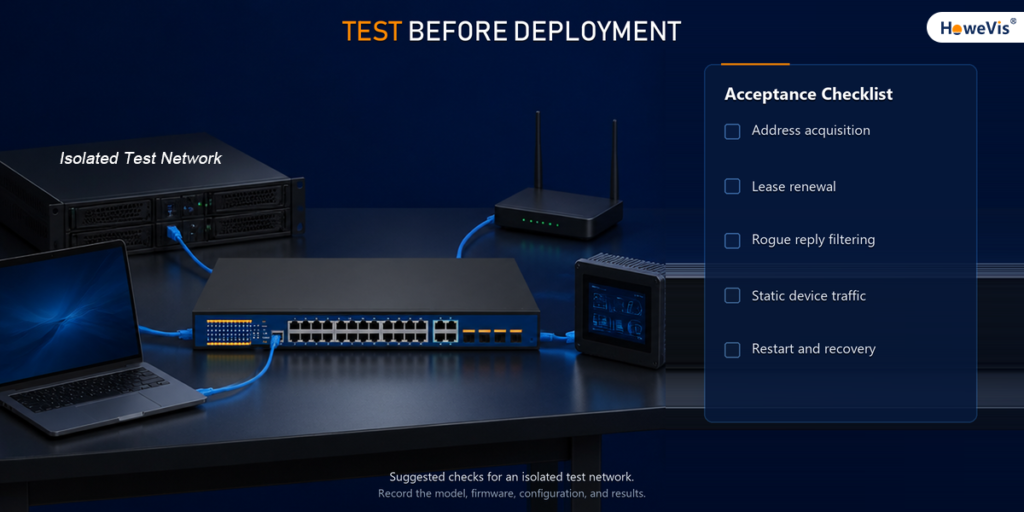
| Test | Acceptance focus |
|---|---|
| Normal address request | The client receives the intended settings |
| Lease renewal | The client renews successfully |
| Unauthorized server | Replies entering an untrusted test interface are blocked |
| Binding information | Client, VLAN, and interface details match the topology |
| Static equipment | Required traffic passes with the planned related policies |
| Rate limit | Normal bursts work and excess-traffic behavior is understood |
| Restart or path change | Recovery matches the agreed design |
Use the switch’s supported management interface, logs, counters, or packet captures to collect evidence.
Do not stop at ping. Include the application traffic the installation depends on.
Record the model, firmware, topology, configuration, and results. That creates a shared reference for the customer and supplier if behavior changes later.
Frequently Asked Questions
Can DHCP snooping prevent every IP conflict?
No. It controls DHCP traffic and maintains binding information. It does not correct every manual addressing error or replace all source-address controls.
Should every uplink be trusted?
No. Trust should reflect where legitimate DHCP server responses enter each switch, not simply whether an interface is described as an uplink.
Why do clients stop receiving addresses after activation?
Check the VLAN scope, trusted response path, Option 82 handling, and rate limits. Review the exact platform’s documentation and use available logs or captures to narrow down the cause.
Does it replace device authentication?
No. Controlling DHCP replies is different from establishing a device’s identity or authorizing access to production services.
Do static-IP devices need additional rules?
Not merely because DHCP snooping is enabled. Additional rules may be necessary when DAI or IPSG is also used, depending on the platform and configuration.
Discuss Your Industrial Switch Requirements
DHCP snooping can help keep an unintended DHCP server from becoming a wider troubleshooting problem. Its value depends on clear trust boundaries, a known addressing plan, and tests that cover legitimate device behavior.
Before ordering, request the configuration guide and agree on a short acceptance test. Confirm the exact model and firmware rather than relying on a series-level feature list.
Planning a new industrial network or upgrading an existing installation? Send HoweVis your port requirements, VLAN layout, DHCP server location, operating conditions, and expected quantity. Include any DAI, IPSG, or static-device requirements so they can be checked against the proposed model.
Discuss Your Project With HoweVis
Share your network requirements to review suitable industrial managed switch options and the functions that need confirmation.